 Vintage PC pages
The IBM 5271 (aka 3270 PC)
- Overview
- Keyboard
- Display
- Host Connect Card
- Related PCs
- Web Links
- Software
- The hardware in other systems
Overview
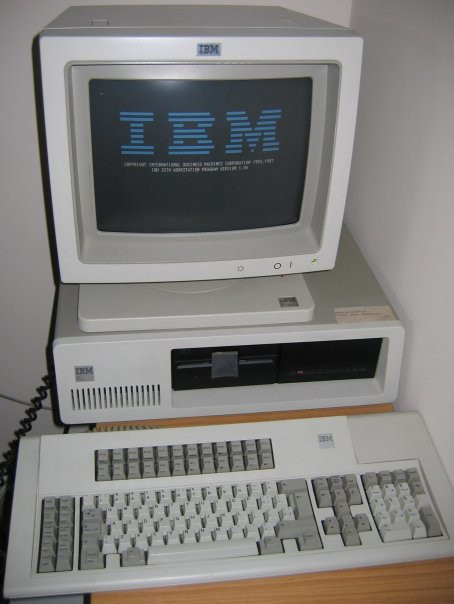
The IBM 5271 can be briefly described as a cross between an XT (model 5160) and a 3270 terminal. Indeed, the 5271 is also known as a "3270 PC".
The case, motherboard, hard and floppy drives, and power supply are all identical (or very similar) to the XT. A specialised keyboard and display (both of which closely resemble the ones used by the IBM 3179 terminal) replace the XT equivalents. To support these, some or all of the following cards will be present:
- Keyboard controller. This also contains the BIOS for all the special cards; so the video cards, for example, won't work without it.
- Video card. I don't think it's got a name, other than "3270 PC Display Adapter" - which, even abbreviated to 3270PCDA, is a bit of a mouthful.
- Host Connect card. Used to connect to the mainframe. The connector is BNC (like 10base2 Ethernet) but isn't Ethernet.
- One or two additional graphics cards (see below).
With all these cards in the machine, that can leave as few as three available ISA slots for the necessities such as hard/floppy drive controllers or extra RAM.
It is possible to convert a 5271 to a normal XT, by removing the specialised display and keyboard cards, and adding a normal display card.
Keyboard
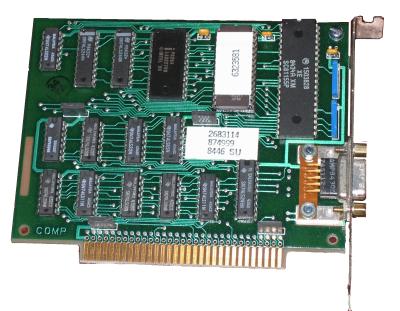
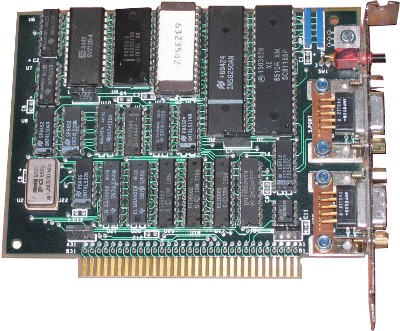
Instead of a normal keyboard, the 5271 uses a 122-key keyboard with 24 function keys and various other 3270-specific keys. The keyboard plugs into a dongle, which in turn connects both to the keyboard socket and to the keyboard controller card.
The 5271 will work with a standard XT keyboard, but displays error 302 when booting; you have to press F1 to continue.
The manual describes two different models of keyboard controller: one with an NMI button and serial port (herein described as the 'complicated' controller), and one without (herein described as the 'simple' controller). Both are illustrated. The manual also says that only the 'complicated' controller supports the use of the 3270 cursor keys in PC programs. Each controller has its own ROM (part no. 6323581 for the 'simple' controller and 6323582 for the 'complicated' one).
Common to both types of controller is the custom chip that handles keyboard signals: it appears to have the IBM part number 1503828, and the Motorola part number SC81155P. Possibly it's a microcontroller, but I don't know what type or (if it is a microcontroller) whether the contents can be read without decapping.
The dongle
The dongle (or, as the Guide to Operations calls it, the keyboard adapter cable) is used to connect the keyboard to the keyboard card and the keyboard card to the PC's normal keyboard socket. As far as I can tell, it contains no electronics of its own; it's just there to split the DE9 socket on the card into a couple of 5-pin DIN connectors.
When I bought my 5271, it was missing its proper dongle, but after copious experimentation I was able to work out the pinout of the socket on the card, and thence a suitable wiring diagram for the dongle. The pinout is:
- XT clock
- XT data
- Key (no pin)
- AT data
- AT clock
- +5v
- Leave disconnected
- Ground
- Ground
To make the substitute dongle, pins 1, 2 and 9 should be connected to the matching pins on the motherboard keyboard connector, and pins 4, 5, 6 and 9 to a 5-pin DIN socket for the terminal keyboard.
(Pins 8 and 9 are both Ground, so it may make more sense to connect Ground on the XT keyboard plug to pin 8 rather than 9).
Since the signals are compatible, it would also be possible to construct a dongle that had a PS/2 socket, or a 5-pin AT socket, instead of a 5-pin terminal socket.
Disclaimer: While I have built a working dongle, it's quite possible that I made a mistake when transcribing the diagram afterwards or numbering the pins. It's a good idea to double-check your wiring against as many references as you can find before actually plugging the thing in...
On the left: an original IBM Keyboard Adapter Cable. On the right: my homemade version.
![[The two dongles,
pictured]](Images/dongles.jpg)
I/O ports, memory, interrupts
The keyboard appears to use I/O ports 01B0h to 01B7h. It can raise interrupts on IRQ2.
If the 3270 scancode 5 (SysRQ) is received, port 0189h is read. The top bit is flipped and the value written back out again.
Ports include:
- 01B0h
- Send keyboard controller command. This appears to be a bitmap,
since all the commands are powers of 2. They include:
- 00h
- Normal operation. After this command, the keyboard status can be read from port 01B2h.
- 02h
- Reset keyboard?
- 08h
- Set XT keyboard clock. When the firmware simulates an XT keypress, it writes the scancode to port 01B1h and then sends 08h followed by 00h to this port.
- 10h
- Send a command to the keyboard (cf writing to port 60h
on an AT-class machine). Command bytes are written to
port 01B1h; then 10h is sent to port 01B0h, and the
keyboard status is read up to 80 times until bit 5
goes high. If bit 5 doesn't go high, keyboard
initialisation is deemed to have failed.
Commands sent during initialisation are:
- F5h
- Set defaults and disable keyboard.
- FCh
- Set some keys to generate break codes. This is done for keys 9, 77h, 7Eh, 65h (CTRL, NumLock, ScrollLock and Insert).
- FAh
- Set some keys to repeat (and only generate make codes). Corresponds to command FBh on a PS/2 keyboard, and is followed by a list of keycodes. The keys it is applied to are the numeric keypad keys, the function keys, and DEL.
- F4h
- Enable keyboard.
- 20h
- Read scancode from keyboard. The scancode can then be read from port 01B2h.
- 40h
- Used in initialisation. 24h is written to the XT scancode port (01B1h). Then the keyboard status is read until bits 6 and 7 go high, which appears to be when a scancode can be read.
- 80h
- Used to acknowledge a keystroke? In the IRQ2 handler, the keyboard status is read. If the low bit is 1, then 80h is written to port 01B0h, followed by 0.
- 01B1h
- Output XT scancodes to this port to send them into the normal keyboard connector. After sending a scancode, send 08h and then 00h to port 01B0h.
- 01B2h
- Data register. Value read depends on last value written to port 01B0h.
- 01B4h-01B7h
- The registers belonging to the 8254 timer on this board.
They get initialised to preset values at startup, and are not
subsequently changed.
Counter 0 generates a square wave with period 4 (possibly a basis for the keyboard clock signals, or perhaps a clock for the microcontroller itself); counters 1 and 2 are set up in software triggered mode with time values of 0DF8h.
The following variables are used in the BIOS data segment:
- 0040:0018
- Bit 0 is 1 if the standard keymap is in use, 0 if a custom keymap has been loaded by INT 52h. It's possible to load two custom keymaps by loading the first, setting this bit, and then loading the second. Note that on AT and later computers, this bit is set if the left ALT key is down.
- 0040:00D2 ('simple' controller only)
- Segment of current scancode translation table. The 'complicated' controller stores this at C040:0110.
- 0040:00D4 ('simple' controller only)
- Segment of alternative scancode translation table. Loading a custom map with INT 52h sets this to the previous default table. Using CTRL+ALT+F1 or CTRL+ALT+F2 to select keymaps swaps the two table pointers over if necessary. The 'complicated' controller stores this at C040:0112.
- 0040:00D6 ('simple' controller only)
- Last translated (XT) scancode. The 'complicated' controller stores this at C040:0114.
- 0040:00EC ('simple' controller only)
- Last 3270 scancode received. The 'complicated' controller stores this at C040:0116.
- 0040:00EF
- Keyboard POST status.
Scancode translation
The keyboard, and its scancodes, now have their own page.Display
The Video Card(s)
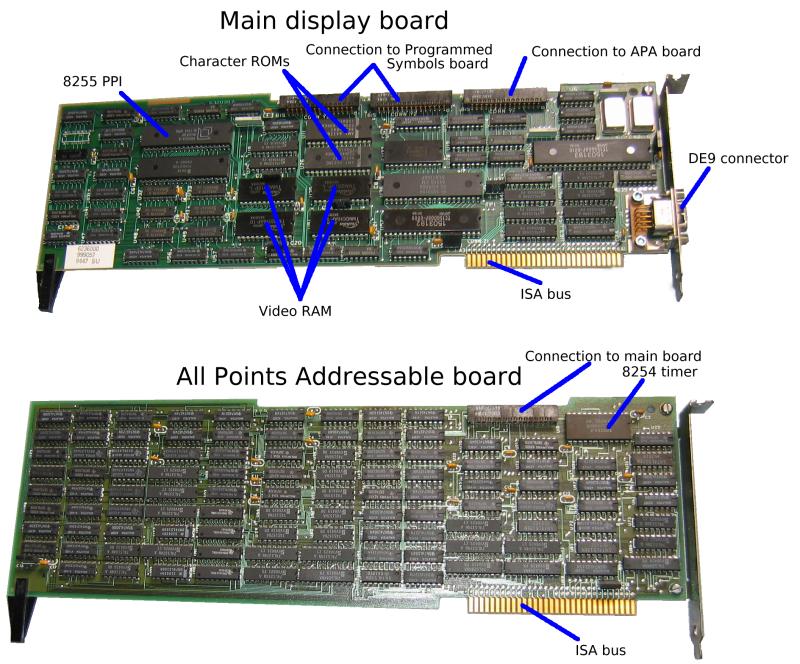
The 5271 video hardware is composed of between one and three full-length ISA cards. If multiple cards are present, they are connected together using rigid connectors.
The three cards are:
- Main card
- Implements 25x80 text mode, and provides video output.
- All Points Addressable option
- Implements CGA graphics modes, plus two modes unique to the 5271.
- Programmed Symbols option
- Allows a user-defined character set to be loaded (only used by 3270 terminal emulator software).
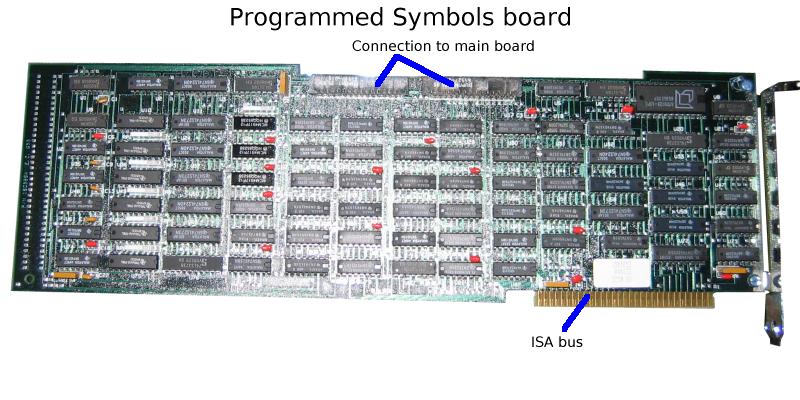
The video switches on the motherboard need to be configured as EGA/VGA rather than MDA or CGA. Depending on what hardware is present, the video BIOS will adjust the settings to behave as MDA or CGA. For some reason the video BIOS is (a) located in the ROM on the keyboard controller card; and (b) mapped into memory in two different places.
The 'simple' keyboard controller maps its onboard ROM into memory in two places:
C0000-C07FF: The first 2048 bytes of the ROM: Video self-test
CA000-CA9FF: The remainder of the ROM: Mode changes, the display
            configuration table, and the keyboard.
The 'complicated' controller does something more like this:
C0000-C01FF: The first 512 bytes of the ROM: Self-test of ROM checksum and
            the 512 bytes of RAM.
C0400-C05FF: RAM, used to hold controller state.
CA000-CA3FF: The last 1k of the ROM: the code that has to stay paged at
            all times. Interrupt handlers, helper routines.
CB000-CBBFF: Bank-switching window in which any part of the ROM can be mapped,
            based on the value written to port 12D8h.
The video card behaves rather like a 3270 terminal screen "in front of" a CGA (or MDA) screen. At startup, the 3270 screen is transparent and can't be seen; a terminal emulator program would make it visible.
I don't have an official pinout for the monitor socket. It's DE9, with at least the following pin assignments:
Pin 3: No connection
Pins 6,7,8: On a colour monitor these are the three colour signals; I'm
            not sure what order they're in.
            On a mono monitor, pin 6 is intensity (probably blue),
            pin 7 is video (probably red), and pin 8 is horizontal
            sync.
Pin 9:      On a mono monitor, pin 9 is vertical sync.
On Twitter, "Tube Time" provides a pinout and video frequencies:
1, 2, 3: ground
4: monitor select: ground=color, float=mono
5, 6, 7: RGB (color mode)
6: intensity, 7: video (mono mode)
8: hsync
9: vsyncvideo specs that i measured:
color mode: hsync = 24KHz negative, vsync = 63Hz negative
mono mode: hsync = 18.6KHz positive, vsync = 50Hz negative
Most of this information comes from studying the boot ROM, the diagnostic utility (INDLTDUK.DGS) and the driver for the 3270 client software (INDSFOMB.COM).
Memory and I/O ports
A0000-A1FFF: 3270 framebuffer
From 0A0000h to 0A1FFFh is the 3270's frame buffer. This appears to have 4 bytes per character cell:
- Byte 0: Character. 0FFh for 'transparent' cell, so the CGA or MDA screen shows through. The other values correspond to characters (not ASCII and not EBCDIC; this is the 3270 internal character set).
Byte 1: Attribute. On a colour display:
	Bits 0-2: Background colour. } 0=Black 1=Blue 2=Red 3=Pink 4=Green
	Bits 3-5: Foreground colour. } 5=Cyan  6=Yellow 7=White
	Bits 6-7: Attribute: 0=Normal 1=Blink 2=Inverse 3=Underline
		  (Ignored for Programmed Symbol fonts 4,5,7 when drawn in
		  white on black; see 'Tri-plane fonts' below).
On a mono display:
	Bits 0-4: Ignored
	Bit  5:   Foreground: 0=Normal 1=Bright
	Bits 6-7: Attribute:  0=Normal 1=Blink 2=Inverse 3=Underline
- Byte 2: If the Programmed Symbols board is not present, this byte cannot be written, and when read is either 0FFh or 0FEh. If the board is present, then the bottom 3 bits select the symbol set to use; 0 for the ROM font, 1-7 for the seven RAM fonts.
- Byte 3: Cannot be written; when read, it is always 0FFh or 0FEh.
AE000-AFFFF: Programmed symbols memory
If bit 3 of port 0188h is set, the initialisation code will test 8k of memory from AE000h to AFFFFh. This holds the RAM font for programmed symbols (see above). The shape data for each character is 16 little-endian words long, with bits 15-7 of the word giving the character shape; bits 6-0 are always zero and cannot be written.
According to its box, the PSS board can hold up to 7 fonts. Internally, it has storage for 1536 characters, which can be used either as six 256-character fonts, or three 256-character fonts plus four 192-character fonts. The low 3 bits of port 0195h select which font is mapped into memory here: number 1-7.
Fonts 1-3 and 6
Font 6 shares its memory with the last 64 characters of fonts 1-3:
Font 6 chars 00-3F = Font 1 chars C0-FF
Font 6 chars 40-3F = Font 2 chars C0-FF
Font 6 chars 80-3F = Font 3 chars C0-FF
Font 6 chars C0-FF = always blank
Thus, these memory ranges can either be treated as four 192-character fonts (using the first 192 characters of fonts 1,2,3 and 6) or as three 256-character fonts (using all of fonts 1,2 and 3).
Tri-plane fonts 4, 5 and 7
The Programmed Symbols board holds the fonts 4, 5 and 7 as three separate planes (red, green and blue). Bits 3-5 of port 0195h select which plane(s) are written at AE000h. The practical effect is that characters in these fonts are held, and can be displayed, as an 8-colour bitmap.
For a tri-plane font, the value read from memory at AE000h is the bitwise OR of the planes selected by port 0195h.
When the characters are drawn onscreen, they appear in 8 colours only for the four attributes 38h, 78h, B8h and F8h — in other words, when drawn in white on black. The 'blink', 'inverse' and 'underline' attributes have no effect when characters are drawn in 8 colours. On a monochrome display, the 'red' plane is mapped to video, and the 'blue' plane to intensity.
For all other attributes, the character shape drawn is the bitwise OR of all three planes.
By way of demonstration, here's what can be done with the aid of tri-plane programmed symbols:
![[Test Card J, rendered on a 5271 Programmed Symbols board]](Images/5271tcj.jpg)
B0000-B7FFF: MDA framebuffer
This is actually mapped to the same memory as the CGA framebuffer; changes to one will affect the other. The buffer is 4k in size, so it repeats at B1000h, B2000h and so on.
B8000-BFFFF: CGA and APA memory
The main video card actually only has 8k of memory on it - 4k for the 3270 display, and 4k for the MDA/CGA display. So the CGA display RAM repeats at B9000h, BA000h etc (in text modes; the APA board takes over in graphics modes). This means that applications that try to use multiple CGA pages won't get on too well.
If bit 2 of port 0188h is set, the initialisation code will test 32k of memory from 0B8000h to 0BFFFFh. Otherwise it just tests from 0B8000h to 0BBFFFh.
On a colour display, the following attribute system is used for both CGA and MDA text output:
Bits 0-2: Foreground colour, matching IBM CGA.
          0=Black 1=Blue 2=Green 3=Cyan 4=Red 5=Pink 6=Yellow 7=White
Bit  3:   Ignored
Bits 4-6: Background colour.
Bit  7:   Blink (if blinking is enabled).
I/O Ports
The CRTC used by the video card is a SCN2672 which is mapped at I/O ports 0180h-0181h:
- 0180h
- Write to 2672 initialization register. The value written is stored in the currently selected initialization register and the next register is selected. For example, if the current register is 6 and a byte is written, register 6 will be updated and the next write will be to register 7.
- 0181h
- Write to 2672 PVTC Command register. Commands include:
- 00h
- Master reset. Sent (four times) at start of initialisation sequence.
- 10h-1Ah
Select initialization register to be written at port 0180h. Register number is passed in the low nibble of the command.
Initialization registers and their default values are:
Number Colour Mono Description 00 68 68 Bits 7-3: Character height - 1
Bit 2: Set for composite sync, clear for separate
Bits 1-0: Buffer mode select: 0=Independent, 1=Transparent,2=Shared, 3=Row01 1E 18 Bit 7: Set for interlace.
Bits 6-0: Equalising constant, calculated as:
EC = 0.5(HACT + HFP + HSYNC + HBP - 2(HSYNC)02 21 28 Bit 7: Unused.
Bits 6-3: HSYNC width
Bits 2-0: Horizontal back porch03 07 40 Bits 7-5: Vertical front porch
Bits 4-0: Vertical back porch04 98 98 Bit 7: Character blink speed (1=normal 0=fast).
Bits 6-0: Rows displayed - 105 4F 4F Columns displayed - 1 06 DD DD Cursor shape: high nibble = top row, low nibble = bottom row 07 8C 8C Bits 7-6: Light pen line (0 => 3, 1 => 5, 2 => 7, 3 => 9)
Bit 5 = cursor blink
Bit 4 = double character height (if set, you should halve the 'rows displayed' value)
Bits 3-0: Underline position08 00 00 Display buffer address (low 4 bits) 09 F0 F0 Bits 7-4: Display buffer last address (0 => 1023, 1 => 2047, 2 => 3071, etc.)
Bits 3-0: Display buffer first address (high 4 bits)0A FF FF Bit 7 = cursor blink speed (1=normal 0=fast)
Bits 6-0 = split screen interrupt row- 20h-3Fh
- Enable / disable commands:
Bit 4 set: Cursor on/off.  Bit 0 sets cursor visibility.
Bit 3 set: Display on/off. Bit 0 is 0 for display off, 1 for display on.
                           For display off, bit 2 set to float DADD bus.
                           For display on,  bit 2 set to enable at next field,
                                                  else next scan line.
Bit 1 set: Light pen on/off. Bit 0 sets light pen enable/disable.
Typical commands sent by the 5271 are:
2Ch: Disable video output
2Dh: Enable video output
30h: Turn cursor off
31h: Turn cursor on
3Ch: Disable video output and turn cursor off.
3Dh: Enable video output and turn cursor on.
- 40h-5Fh
- Clear latch(es) from status register. Bits
4-0 give latch(es) to clear:
Bit 4: Vertical blank
Bit 3: Line Zero
Bit 2: Split Screen
Bit 1: Ready
Bit 0: Light Pen
Typical commands sent by the 5271 are:
48h: Clear line 0 latch
50h: Clear vertical blank latch
58h: Clear line 0 latch and vertical blank latch.
- 60h-7Fh
- Enable interrupt on selected status register latches (bits 4-0 as above)
- 80h-9Fh
- Disable interrupt on selected status register latches (bits 4-0 as above)
- 0A2h
- Write at pointer address
- 0A4h
- Read at pointer address
- 0A9h
- Increment cursor address
- 0AAh
- Write at cursor address
- 0ACh
- Read at cursor address
- 0ABh
- Write at cursor address and increment address
- 0ADh
- Read at cursor address and increment address
- 0BBh
- Write from cursor address to pointer address
Reading from port 0181h (which the diagnostic program calls '2672 status') returns the status register:
Bits 7-6: 0 (unused) Bit 5: "RDFLG" (0=Busy 1=Ready) Bit 4: Vertical blank latch. Set by vertical blanking interval; cleared by command 50h. Bit 3: Line 0 latch. Set by screen line 0 being drawn; cleared by command 48h. Bit 2: Split screen Bit 1: Ready (0=Busy 1=Ready) Bit 0: Light pen (0=No 1=Yes) - 0182h / 0183h
- Start screen address. These two bytes should be treated as a 14-bit value (the low 8 bits at 0182h, the high 6 bits at 0183h). They set the first character to display for both 3270 and CGA/MDA framebuffers. The address is in characters rather than bytes; to put line 1 at the top, set the address to 80 (50h).
- 0184h / 0185h
- Cursor location. Held in the same way as start screen address.
- 0188h
- Read-only register: Hardware status.
- 0189h
A read/write register. The self-test checks this by storing 0FFh and 0 in it, and checking that it can read back both values.
The bits used in this register are:
Bit 7: Toggled when SysRQ is pressed. Bit 6: In normal use, initialised to 1 by the BIOS. Bit 5: Enable diagnostic readback on bits 6-4 of port 0188h. Bit 4: Unknown (usually 0) Bits 3-0: CGA/MDA framebuffer offset, high 4 bits (see 018Ah below).
The diagnostic readback is used by the self-test. When it is turned on, the red/green/blue bits in port 0188h go high (and stay high) when anything, including the cursor, is drawn in the corresponding colour. So the self-test checks firstly that blank video RAM causes nothing to be drawn, and then that a pattern in video RAM causes something to be drawn.
If the system has a mono monitor, only the 'red' and 'blue' output lines (presumably some combination of 'video' and 'intensity') appear to be tested.
- 018Ah / 018Bh
-
018Ah, together with the low 4 bits of 0189h, are referred to by the diagnostic program as 'PC offset'. They hold a 12-bit value (018Ah gives the low 8 bits, 0189h the high 4). The values read from these ports give the offset currently in use, which may not be the same as the value written to them.
This value is used as the index, in the MDA framebuffer, of the character to display at (0,0). Port 018Bh is initialised by the BIOS to 90h, which resets the low 4 bits of 0189h and all of 018Ah to 0.
The values written to port 018Bh appear to act as commands. If the top bit is not set, then the low nibble seems to indicate a bit set/clear operation:
x0h clears bit 0 of port 018Ah x1h sets bit 0 of port 018Ah x2h clears bit 1 of port 018Ah x3h sets bit 1 of port 018Ah ... xFh sets bit 7 of port 018Ah
Port 018Ah is also used by the diagnostic diskette to detect 3270PC hardware; it writes 0 to this port and checks that the value returned is 0.
- 018Ch
-
Interrupt/Control register. Set bit 6 of this port to enable interrupts on IRQ2, triggered when a value is written to an emulated CGA register. Other bits are always written as 0.
The diagnostic diskette tests that bits 6 and 0 of this port can hold the values written to them.
On read, bit 4 is set if interrupt was triggered by a write to the CGA mode control register (port 03D8h); bit 5 if it was triggered by a write to the CGA cursor position (6845 registers 0Eh/0Fh) or cursor size (registers 0Ah/0Bh).
- 0190h
A counter which appears to affect the vertical position of the video output on the screen. Written to by the ROM and the diagnostic diskette, when reinitialising the adapter. In each case, two bytes are written, forming a little-endian word. For mono, the value is 88A9h; for colour, 9569h.
When read, returns the current value of the counter, working down from the maximum value written to 0.
- 0191h
- Left margin. Written to by diagnostic diskette, when reinitialising the adapter. As 0190h, a little-endian word; values written are 0060h (mono), 0065h (colour) and 0061h (during tests). The higher the value, the further to the left the screen is drawn.
- 0192h
- This appears to be another little-endian word. The ROM initialises it to 0050h, and then leaves it alone. Writing other values does not appear to have any effect. On read, the result is always 0.
- 0193h
Written to by the ROM and the diagnostic diskette, when reinitialising the adapter. The only values written appear to be 32h (immediately before a write to port 190h), 72h (after writing to port 190h, and at other points in the diagnostics), 0BAh (final initialisation in ROM).
Always returns 0FFh on read.
- 0194h
- Read by the diagnostic program. Always appears to return 0FFh.
- 0195h
- Programmed Symbols Mask register.
Bits 0-2: Select font memory bank at 0AE000h, number 1-7. Bit 3: Write blue plane (on a mono monitor, intensity) Bit 4: Write green plane Bit 5: Write red plane (on a mono monitor, video)
The selection of planes applies to fonts 4, 5 and 7; these fonts are held as three planes, allowing characters to have an intrinsic colour. If all of bits 3,4 and 5 are zero, all three planes are written (as if they were all 1).
Font 6 shares memory with the last 64 characters of fonts 1,2,3.
- 0196h-019Bh
- All Points Addressable registers.
Mode select for 720×350 or 360×350 mode is: OUT 0196, 8 OUT 0197, 7Fh OUT 0198, 82h OUT 0198, 3Dh OUT 019A, 2Ch For all other modes (text and CGA-compatible graphics), it is: OUT 0196, 0 OUT 0197, BFh OUT 0198, 7Ah OUT 0198, 0Ch OUT 019A, 27h The initialisation code sends: OUT 0197, 0BFh OUT 0196, 07h OUT 019B, 3Ah OUT 0198, 7Ah OUT 0198, 0Ch OUT 019B, 5Ah OUT 0199, 2Ch OUT 019B, 9Ah OUT 019A, 27h - 0196h
-
The diagnostic program calls this 'Video Ctl Reg'. When written
Bit 4: Odd pixel flag. The register at 0197h shifts the graphics bitmap pattern to the left in units of 2 pixels. This setting shifts the pattern one pixel to the right, allowing exact positioning of the graphics viewport within the screen. This flag should only be used in the 1bpp graphics modes (720×350 and 640×200); in the 2bpp modes, it takes effect before the bit stream is converted into colours. So, for example, the bit pattern 10110000 (magenta, white, black, black) would be shifted to 01011000 and then interpreted as cyan, cyan, magenta, black. Bit 3: Select mode. Set for native mode (linear framebuffer of 31500 bytes). Clear for CGA-compatible mode (interleaved framebuffer of 16192 bytes). Bits 2-0: Appear to be connected to the diagnostic readback on the low 3 bits of port 0197h — possibly a bitmask? - 0197h
-
Referred to by the diagnostic utility as 'Pell[sic] Offset Register'. When written, causes the graphics screen to be shifted to the left at the pixel level.
Hex Binary Result 7F 01111111 Bytes are displayed unshifted BF 10111111 Screen is shifted left by 2 pixels (1 pixel in 360×350 and 320×200 mode) DF 11011111 Screen is shifted left by 4 pixels (2 pixels in 360×350 and 320 ×200 modes) EF 11101111 Screen is shifted left by 6 pixels (3 pixels in 360×350 and 320 ×200 modes) F7 11110111 Screen is shifted left by 8 pixels (4 pixels in 360×350 and 320 ×200 modes) FB 11111011 Screen is shifted left by 10 pixels (5 pixels in 360×350 and 320 ×200 modes) FD 11111101 Screen is shifted left by 12 pixels (6 pixels in 360×350 and 320 ×200 modes) FE 11111110 Screen is shifted left by 14 pixels (7 pixels in 360×350 and 320 ×200 modes) FF 11111111 Entire CGA/MDA screen displays in solid white. Other values have unpredictable results. For example 3Fh (00111111b) shifts to the left by one pixel and masks each byte with itself shifted by one bit (so 2-pixel uprights in letters become 1-pixel).
When read:
Bit 7: Always 0. At least, the APA self-test and the diagnostic diskette require this to be 0. Bit 4: Vertical retrace Bit 3: Reflects bit 3 of value written to port 0196h. Bits 2-0: Used when testing the CGA colour select register; in the diagnostic utility, the value read from these bits should reflect the value written to the colour select register. At a guess, they're the colour of the pixel currently being drawn, at least during that particular test.When testing this port, the diagnostic diskette writes the values 1,2,4,8 to port 0196h, and checks that the corresponding value read from port 0197h (masked with 8Fh) is 0,0,0,8.
- 0198h
The diagnostic program calls this 'Start offset counter'. Two successive bytes are written to it, forming a little-endian word, giving the number of blank words to output before beginning to draw the contents of the graphical framebuffer.
For some reason, the value 0000h places the graphics origin 5 words to the right of the top left-hand corner of the screen. To get at the first four words of the screen, 3D82h-3D85h are used.
In CGA graphics modes, this word is initialised to 0C7Ah. In the native graphics mode, it is initialised to 3D82h.
The current value of this counter can be read back by two successive reads from port 0198h (for the low and high bytes). Depending what part of the screen is being drawn, it can return anything from 0 to the value written.
- 0199h
The diagnostic program calls this 'Display Width Counter'. Initialised to 2Ch by startup, and not subsequently touched.
The value in this register, less the value of the Graphics Width Counter (019Ah) gives the number of blank words output between each line of the graphical framebuffer. If it is set to 59h (89) rather than its usual 2Ch (44), then 45 blank words (ie, a blank line) will be output between each line of graphical output.
Decreasing this below the value of the Graphics Width Counter has no effect.
When read, returns the current value of the counter (ie, anything from 0 to the value written).
- 019Ah
The diagnostic program calls this 'Graphics width counter'. It holds the number of 16-bit words on each line of the graphical display (less 1). Zero, and values above 2Ch, are treated as 2Ch.
The APA card always draws a fixed number of bytes from the framebuffer, so halving the width of the graphics area doubles its height.
When read, returns the current value of the counter (ie, anything from 0 to the value written).
- 019Bh
- Various values are written at initialisation, but not subsequently. The
meaning of the values is not generally known, but:
3Ah appears to be written before an attempt to write to port 0198h. Possibly this resets the flip-flop on that port, so that the next read/write is guaranteed to access the low byte of the value. 5Ah is written before a write to port 199h. 9Ah is written before a write to port 19Ah. - 03B4h/03B5h
- At least some of the emulated CRTC. The IRQ2 handler reads registers 0Eh/0Fh (cursor location) and 0Ah/0Bh (cursor size); on a real MDA/CGA, the latter two cannot be read.
- 03D8h
- CGA mode control register. Read/Write in the 3270 PC, because at least some CGA emulation is done by the firmware.
- 03BAh / 03DAh
- Simulated MDA / CGA status register. Alternate reads of these ports return 01, 08, 01, 08, ....
- 12D8h
- Used by the 'complicated' keyboard controller card. It appears to set which range of the ROM is visible in a memory window from 0CB000h to 0CBBFFh.
       Bit 7: Vertical retrace?
       Bit 6: Diagnostic readback, red. See 0189h below.
       Bit 5: Diagnostic readback, blue.
       Bit 4: Diagnostic readback, green.
       Bit 3: Set if Programmed Symbols board is present.
       Bit 2: Set if All Points Addressable board is present.
       Bit 1: Set if a monitor is present.
       Bit 0: Monitor type - 1=5272 colour, 0=MDA mono.
The Monitor
The monitor (model 5272) is bigger than a normal CGA or MDA monitor, and has a swivelling/tilting stand. It is capable of Hercules resolution (720×350) in 7 colours plus black.
A standard MDA monitor can also be used on a 5271. The graphics card detects whether the monitor is colour or mono, and restricts the available video modes accordingly.
The Fonts
The font used in the 5271 uses a 9x14 character cell, the same as the MDA. However the font has been changed from serif to sans-serif, and looks markedly better as a result. In addition, other characters than those in the range 192-223 make use of the 9th pixel column - for instance, the 'q' does.
| IBM 5271 font | IBM MDA font |
|---|---|
![[3270 font]](Images/5271font.png) |
![[MDA font]](Images/mda9.png) |
| The font used for the 3270 terminal framebuffer at 0A0000h uses a 3270 native encoding, which is similar to the "3270 CG" encoding desribed at x3270.bgp.nu, but diverges quite a bit in the last 64 characters. | |
![[3270 terminal font]](Images/5271term.png) | |
The fonts are stored in two 8k ROMs on the display board. One ROM holds the left-hand 8 pixels of each character; the other just holds the ninth pixel.
Colours
In text mode, the 5271 behaves something like a CGA. However, there is no high intensity; 'high intensity' and 'standard' colours look exactly the same. The actual colours look quite different, too.
The following palette values are approximate. The 'normal' ones come from Linux DOSEMU; the '5271' ones from putting a VGA beside the 5271, and fiddling with the VGA palette until the two displays looked similar.
| Colour | IBM 5271 colour | Normal colour |
|---|---|---|
| 0 | #000000 | #000000 |
| 1 | #6080A8 | #0000a8 |
| 2 | #008000 | #00a800 |
| 3 | #60C0A8 | #00a8a8 |
| 4 | #A83000 | #a80000 |
| 5 | #C06080 | #a800a8 |
| 6 | #A08000 | #a85400 |
| 7 | #A0A080 | #a8a8a8 |
The table suggests that the 5271 uses 4 possible levels for each of the three primary colours (roughly, #30, #80, #A0 and #C0). I suspect that these colours are generated in the monitor, with the host PC sending simple on/off levels of Red/Green/Blue.
CGA Emulation and BIOS
Starting at the hardware level: The hardware of the CGA controller is not emulated completely, only enough to support a standard CGA BIOS. The CGA mode control register at 03D8h differs in the following respects:
- The register is read/write, not write-only.
- In text mode, bits 0 (40x25 mode) and 3 (enable/disable display) are ignored completely. Attempts to select a 40x25 mode will be caught by the IRQ2 handler and converted to the corresponding 80x25 mode.
- In graphics modes, changing any bit of this register (except bit 1) will cause the video RAM to be cleared (by the IRQ2 handler). This means that you can't switch between the Red/Cyan/White CGA colour scheme and the other two (Red/Green/Yellow or Magenta/Cyan/White) without a full mode change.
In addition, most of the 6845 CRTC is not emulated; so it is not possible to select the 160x100 "graphics" mode by starting in 24x80 and reprogramming the CRTC.
Although the 5271's graphics card provides its own video BIOS, this does not replace the standard ROM BIOS. The ROM is still used for nearly all functions, the exceptions being function 00h (set mode) and 30h (locate configuration table).
- Function 00h: Set mode
- This does a little extra hardware setup, stores the correct aspect ratio for the selected mode, and then jumps to the ROM BIOS routine. It also supports two extra modes, numbers 30h (720×350 mono graphics) and 31h (360×350 4-colour graphics, using CGA palette).
- Function 30h (CX = 0): Return 3270 PC configuration table
The 6323581 ROM does not check CX. The 6323582 ROM requires CL to be zero, but does not care about CH.
The table returned (CX:DX points to it) is similar to that described in the Interrupt List, but it is at most 6 bytes long, and possibly as few as two:
00h: Aspect ratio X 01h: Aspect ratio Y 02h: Monitor type (0 => MDA or 5272). 03h: Always 0 04h: Video adaptor type (0 => standard 5271, 1 => XGA, 2 => G/GX). 05h: Always 0- Function 30h (CL = 01h)
- Present in the 6323582 ROM only. CH is a (translated) code passed from the keyboard table. CH=0D9h is treated as SysRQ: if ALT is pressed, toggles the top bit of port 0189h, else beep. CH=0FDh always beeps; other values of CH do nothing.
- Function 30h (CL > 1)
- In the 6323582 ROM, calling this function with CL=2 or higher will return leaving CX unchanged and Carry clear.
The two extra graphics modes have a very simple memory layout - simply 350 lines of 90 bytes each, with no interleaving or funny tricks.
The following addresses in the BIOS data segment are used by the 5271 graphics card:
0040:00C8: Aspect ratio X (start of 3270PC configuration table)
0040:00C9: Aspect ratio Y
0040:00D8: BIOS INT 10h handler address.
0040:00EE: Result of self-test (bitmap). 0 if all tests passed; bits set
           if one or more tests failed.
Error codes
- 3201
- Graphics card fault
- 3202
- Programmed Symbols card fault
- 3203
- All Points Addressable card fault
Host Connect Card
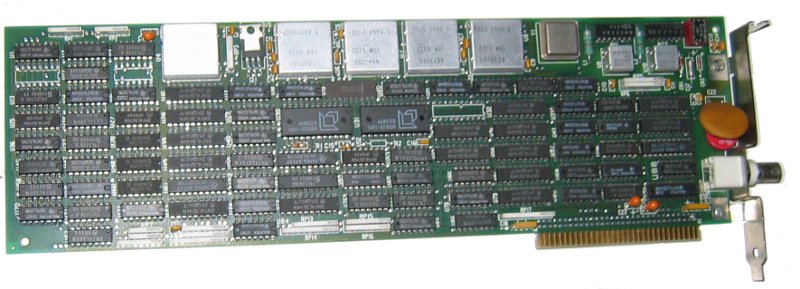
There are two types of card supported by IBM's diagnostic program - an "older model long card adapter", and a newer one. The 5271's ROM only detects the older model; this has a 4k buffer at 0CE000h and uses I/O ports from 2D0h to 2D6h. The newer version adds a port at 2D7h (which seems to be used to set the base address of the buffer), increases the size of the buffer, and makes the I/O port base configurable (using switches on the card). A BIOS upgrade to support the new (shorter) cards may have existed.
The technical reference for the older version of the card can be found at bitsavers.org. The I/O ports are:
02D0  Interrupt / Status register. Bits 0-5 = interrupt reason (set by card,
	reset by PC):
	Bit 0 = Keystroke Accepted
	Bit 1 = Reset Command Decoded
	Bit 2 = Visual / Sound Register Updated
	Bit 3 = Reserved
	Bit 4 = Base Buffer Modified Complete
	Bit 5 = Load I/O Address Command Decoded

	Bits 6-7 = status bits:

	Bit 6 = Buffer Being Modified
	Bit 7 = Interrupt Generated

02D1  Visual / Sound Register. On read:
	Bit 0 = 80 characters / line
	Bit 1 = Inhibit Feature Step of Address Counter
	Bit 2 = Inhibit Display
	Bit 3 = Inhibit Cursor
	Bit 4 = Reverse Cursor
	Bit 5 = Blink Cursor
	Bit 6 = Sound Alarm
	Bit 7 = Enable Clicker

	Writing resets bit 6.

02D2  Cursor Address Register bits 7-0
02D3  Cursor Address Register bits 15-8
02D4  Control Register. Read/Write:
	Bit 0 = Enable link
	Bit 3 = Key pressed (set by PC after Scan Code Register loaded; reset
		by card when scancode transmitted).
	Bit 5 = Test mode
	Bit 7 = Disable interrupts from card to PC

02D5  ~Scan Code. Written by PC to send a scancode to the host.
02D6  ~Terminal ID. Must be set before enabling the link.
Error codes
- 2801
- Host Connect card initialisation failed
Related PCs
The 5271 was the first in a line of PCs with hardware support for 3270 terminal emulation. Information about later such PCs is extremely sketchy; but they include:
- The 3270 PC/G and 3270 PC/GX. These added more sophisticated graphics capabilities and mouse support. A different monitor (model 5279 or 5379) is used. According to this USENET thread, the 5279 monitor has a separate tilt/swivel base (5278) packed with circuitry and connected by a connector that's "at least 75 way". Similarly the 5379 (a 19" monitor) uses a 5378 converter box.
- The 3270 AT, 3270 AT/G and 3270 AT/GX - the same sort of specialist cards, but hosted in an AT rather than an XT.
The Interrupt List gives the following display-card-and-monitor combinations:
| Number | Monitor type | Possible models |
|---|---|---|
| 0 | 5151 (mono) or 5272 (colour) | Original 3270 PC or 3270 AT |
| 1 | 3295 plasma display | A large plasma display that could show one, two or four 3270 sessions. |
| 2 | 5151 or 5272 with XGA* | Unknown |
| 3 | 5279 with PC/G adaptor | 3270 PC/G or 3270 AT/G |
| 4 | 5379-C01 with PC/GX adaptor | 3270 PC/GX or 3270 AT/GX. Possibly C stands for Colour and M stands for Mono. |
| 5 | 5379-M01 with PC/GX adaptor | 3270 PC/GX or 3270 AT/GX. |
*: 'XGA' appears to be one of those reused abbreviations that causes endless confusion. According to the 3270 Workstation Program Users' Guide and Reference, it refers to an "Expanded Graphics Adapter Card" that seems to have disappeared without a trace. The acronym was reused by IBM in 1990 for their "Extended Graphics Array", and that's its general meaning today.
By the time of the PS/2 era, 102-key keyboards and VGA graphics meant that there was no need for specialised hardware, and later 3270 emulation appears to have been done with just software and a Host Connect card.
Web Links
Other 3270 PC sites
- nothingtodo.org has a picture of a 5271 with its proper keyboard.
- yesterpc.com has a large number of pictures of the AT version of the 3270PCDA. This differs in various respects from mine; for example, the video BIOS appears to be in a separate chip on the All Points Addressable board rather than being part of the keyboard controller, and both the APA and Programmed Symbols boards are of a shape to fit in a 16-bit ISA slot.
- Bitsavers have a number of 3270PC manuals.
Patents
The following patents mainly seem to describe the windowing system on the 3270 PC:
- European Patent Application 0147542
- US Patent 4641262 deals with combining an IBM PC with a 3278 terminal — a possible forerunner of the 3270PC, which is more like an XT combined with a 3179 terminal.
- US Patent 4651146
- US Patent 4653020
- US Patent 4890257
- US Patent 4663617 deals with the various offset registers in the All Points Addressable board.
Diagnostics
- Version 2.25 of the XT diagnostic floppy can be downloaded from this archive of IBM reference diskettes. The file in question is XTDGS225.DSK, and you'll also need LOADDSKF.EXE to unpack it.
- From IBM's own site: Diagnostics for the Host Connect card.
Software
- If you use GEM, there is a driver for the 720×350 mono mode, which you can find on the Video Drivers list.
- I have patched Digital Research LOGO to support the 720×350 and 360×350 video modes. This is a CP/M-86 program, so you will need to get hold of Personal CP/M-86 from http://www.cpm.z80.de/binary.html to use it.
The hardware in other systems
Recently the motherboard in my 5271 failed with a blown capacitor, and while I had the PC dismantled pending repairs I experimented with putting the video card in a couple of other XTs to see what would happen. After a bit of fiddling, I was able to get it to work on both systems I tried: a Sinclair PC200, and an Amstrad PC3086. Based on this small sample size, here is my advice for using 5271 hardware on other systems:
- If your XT has any sort of built-in video subsystem, it must be disabled.
- The video cards will only fit in full-length 8-bit ISA slots. I haven't experimented with AT motherboards, but even for a simple test you'd need one with an 8-bit ISA slot. For the full trio of video cards you need three adjacent 8-bit slots at the correct spacing.
- The minimum requirement is two slots, one full-length; the full-length slot for the video card, and the other one for the keyboard controller with the ROM.
- The maximum requirement is five slots - the above cards plus the All Points Addressable, Programmed Symbols and Host Connect boards.
John Elliott 16 October 2012